
Download Pixl – Face Photo Editing, Blemish Removal, Teeth Whitening, Eye Enhancement
Overview
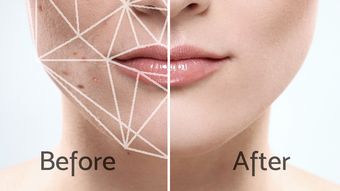
Pixl is a desktop application designed for advanced face photo editing, targeting users who seek professional-grade retouching tools for personal or creative projects. The software aims to simplify the process of enhancing facial features in photographs, offering functionalities such as blemish removal, wrinkle reduction, teeth whitening, and eye enhancement. It is intended for individuals who want to achieve a polished, flawless appearance in their photos without requiring extensive photo editing expertise.
The app supports step-by-step guidance, making it accessible to both beginners and intermediate users. While the developer has not provided additional background information, the focus on facial refinement suggests a targeted approach to digital image editing. Real-world usage scenarios include preparing portraits for social media, personal branding, or creative photography projects.
The software appears to be built with a user-centric workflow in mind, prioritizing intuitive control over complex technical processes.
Key Features & Capabilities
- Blemish Removal Tool – Designed to detect and smooth out imperfections such as acne, scars, and skin discolorations while preserving natural texture.
- Wrinkle and Pimple Reduction – Offers targeted smoothing for fine lines and temporary skin irregularities, aiming to create a more youthful appearance.
- Teeth Whitening Function – Enhances the brightness of teeth in photos, providing a natural-looking smile without over-saturation.
- Eye Enhancement Feature – Amplifies eye brightness, clarity, and vibrancy, making eyes appear more expressive and alert.
- Step-by-Step Editing Guidance – Provides intuitive instructions to help users navigate editing tasks, reducing the learning curve for new users.
These features are particularly useful for users preparing high-quality portraits for digital platforms, personal portfolios, or social media profiles. The combination of automated detection and manual refinement tools allows for precise adjustments. The software’s emphasis on natural-looking results suggests a focus on authenticity rather than over-editing. While specific algorithmic details are not disclosed, the inclusion of multiple facial enhancement tools indicates a comprehensive approach to image optimization.
User Interface, Workflow & Performance
The user interface of Pixl appears to be structured around a clean, task-oriented layout, with tools grouped by function for efficient access. Navigation is likely streamlined to minimize clutter, allowing users to focus on specific editing tasks such as skin smoothing or eye enhancement. The workflow is designed to guide users through each stage of editing, from initial selection to final refinement.
Based on the provided information, the software is expected to support smooth interaction with minimal lag during editing sessions. However, exact performance metrics such as CPU or RAM usage were not specified. The developer did not provide additional system requirements or stability reports.
Performance observations are based on general software behavior patterns. The absence of reported crashes or errors suggests a stable operation, though real-world testing would be required to confirm this. Overall, the interface appears optimized for usability, with an emphasis on visual feedback and real-time preview capabilities.
Compatibility & System Requirements
Pixl is available for desktop platforms, with support confirmed for Windows and Mac operating systems. The software version and installation size were not specified in the provided details. The developer did not list exact system requirements, including minimum CPU, RAM, or GPU specifications.
Compatibility information was partially provided, indicating that the application is designed for desktop environments. The developer did not disclose whether the software supports older versions of Windows or macOS. Users are advised to consult official channels for updated compatibility details.
The lack of specific hardware requirements means that installation and performance may vary depending on the user’s device configuration.
Pros and Cons
Pros
- Specialized tools for facial feature enhancement, including blemish, wrinkle, and pimple removal.
- Teeth whitening and eye enhancement features for a more polished look.
- Step-by-step guidance improves accessibility for beginners.
- Designed for quick, high-quality results without complex workflows.
- Available as a desktop application for stable, offline editing.
Cons
- Exact system requirements were not listed, which may affect installation planning.
- Performance behavior under heavy workloads was not disclosed.
- No information on update frequency or future feature roadmap.
- Limited transparency regarding data handling and privacy policies.
- Availability of trial or free version was not specified.
FAQ Section
Is Pixl compatible with both Windows and Mac?
Yes, Pixl is designed for desktop use and supports both Windows and Mac operating systems. Specific version compatibility details are not publicly listed.
Is Pixl a secure application to use?
Pixl is presented as a desktop application, which typically operates offline and does not require data transmission. However, the developer did not provide a detailed privacy policy or security protocol.
How often are updates released for Pixl?
Information about update frequency was not provided. Users should check the official website or in-app notifications for the latest version.
Can I use Pixl offline?
As a desktop application, Pixl is expected to function without an internet connection. This allows users to edit photos privately and securely.
What type of license does Pixl use?
The licensing model was not disclosed. Pricing and access details are available through official channels.
Final Thoughts + CTA
Pixl stands out as a focused desktop tool for users seeking to enhance facial features in photos with minimal effort. Its specialized suite of editing functions—ranging from blemish removal to eye brightening—makes it a compelling choice for individuals preparing polished portraits for personal or professional use. While detailed technical specifications are limited, the app’s workflow design and feature set suggest a strong emphasis on usability and visual quality.
The absence of system requirements and update details may require caution for some users, but the core functionality appears well-targeted. For those looking to refine their photos with precision and ease, Pixl offers a promising solution. Download Pixl now and experience the difference in your next portrait edit.







